The Ultimate Guide to CSS Gallery Inclusion
Design Shack started out as a simple CSS gallery, featuring well designed websites that caught my eye. Tens of thousands of designs have been submitted over the past few years, and each one has been considered carefully for inclusion. The sad fact is that only around 5% of submissions stand out from the crowd.
This could be due to any number of factors; the site didn’t get the basics right, didn’t have anything remarkable to show, or (occasionally) was let down by content. This guide will walk you through how to make sure you stand a great chance of inclusion, avoiding all the pitfalls so commonly stumbled into by designers. At each stage, we’ll take a look at one great example, and one that’s not so good.
2 Million+ Digital Assets, With Unlimited Downloads
Get unlimited downloads of 2 million+ design resources, themes, templates, photos, graphics and more. Envato Elements starts at $16 per month, and is the best creative subscription we've ever seen.
Nail the Basics
 It’s common to see a site fall down at the first hurdle, not nailing the basics of a good design. Areas worth taking the time to get right include typography, spacing, and colours (or usually a combination of all three!).
If you’re looking for a comprehensive overview of the building blocks of design, check out Five Simple Steps. It’s worth every penny, and has taught me a great deal about design principles I previously neglected.
Typography
Typography is probably the most commonly overlooked element of a design. It carries a great deal of importance, and can make or break a website.
Think carefully about the type you’d like to use in headings and the body of your site. Although a few years ago you were severely limited to a handful of “web safe” fonts, using a system such as Cufon or sIFR means that the font possibilities are endless.
The important thing is to select two or three fonts, and stick to them in a sensible hierarchy throughout the site. Create a sample post that shows what various different tags look like, to ensure you’ve styled everything correctly. This could include:
- Headings (h1 and onwards)
- Lists
- Quotes
- Links (and heading/image links)
- Acronyms
- Emphasis/Italic/Bold/Strong
- Code Formatting
Spacing
It’s vital to lay items out correctly on the page with enough space to ensure everything is readable. Conforming to some type of grid structure is important, with the 960 Grid System a popular choice.
Ensure that whitespace is used extensively, and draws the reader’s eye to important elements on the page.

Colours
Choosing a colour scheme for a site is far from simple (and we’ll be covering a few tools to help you in a forthcoming article). It’s difficult to find a unique colour scheme, that doesn’t detract from the readability of the page.
If you’re stuck for inspiration, Colour Lovers is a great site for quickly flicking through various different swatches and combinations.
Add Something Creative
Whilst hitting all the basics may be enough to get a site featured, going the extra mile with a new and innovative design can really help to capture attention. This could be an interesting layout, background, or possible just incredible attention to detail on every last element of the page.
Web design often gets incredibly “stuck in a rut”, with a certain style becoming pervasive for a few months before something new rises to popularity. Sites that break free of this “trend-following” are far more likely to be featured, as they have far more potential to inspire.
Graphical Elements
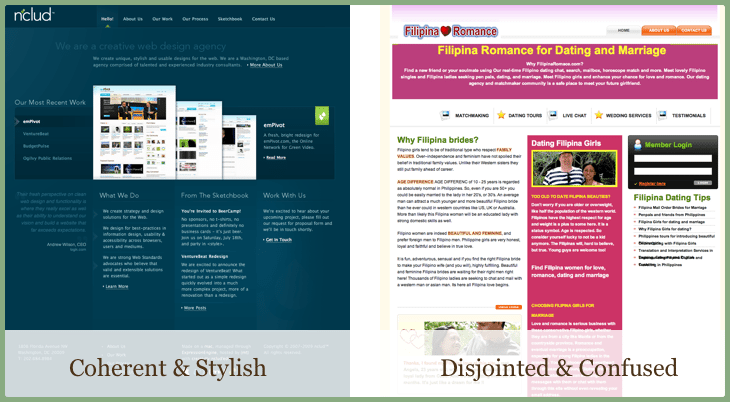
The most obvious place for innovation to come from is the graphical elements on a page. That said, graphics need to coherently enhance the look of a page, rather than feeling disjointed and cluttered. These two examples are great illustrations of imagery and illustration used to good, and bad, effect:
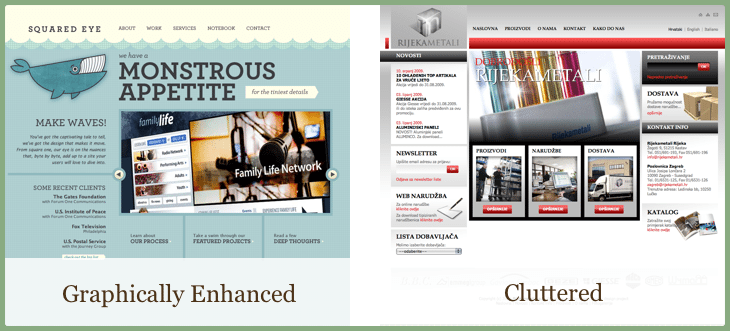
Adding a unique and interesting graphic is a great way to inject personality into your site, and make readers feel at home.
Animation
With the animation possibilities provided by systems such as jQuery, there’s no reason to keep a site static. It’s also now possible to do this is a usable and semantic way without needing to resort to Flash.
I’m not talking about tacky animation, rather effects that make a page feel “sleeker” and more fluid. A great example of this is Tim Van Damme’s personal site, which is a real pleasure to use:
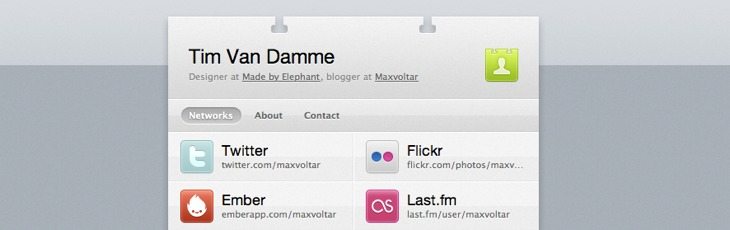
Try adding a simple effect to the rollover property of your links, to offer a smooth transition from one state to another.
Navigation
The main purpose of website navigation should always be to provide a clear way for the reader to access content. However, that doesn’t mean that you need to stick with a standard list of links. Whether you’re going for vertical or horizontal navigation, it’s easy to add interest with a few graphics:

I realise I’m being very hypocritical here (look at our boring list of links!), but I feel that Design Shack fits better with a plain navigation style. Different sites have different requirements!
You might like to take a look at one of our partner sites, 13 Styles for some interesting menus to download for free.
Think Twice About Content
Many people think that it should be possible to keep the design and content of your site relatively separate. This is rarely the case, and the content of a page can have a major impact on whether it’s suitable for inclusion.
Badly written copy, spelling mistakes, and grammatical inaccuracies are fairly inexcusable. If you’re hoping to put forward a professional image with your website, taking the time to perfect the copy is really important. It says a lot about your attention to detail, and most galleries are unlikely to feature you if a page is littered with spelling mistakes.
Advertisements
Many sites rely upon advertising to generate income and keep a project going (us included!). This doesn’t mean that ads need to come at the expense of good design, and they need to be used sparingly. If you have enough demand to fill every spare inch of space on your site with advertising, you simply aren’t charging enough!
Generally speaking, it’s better (though not necessarily as profitable) to avoid confusing readers. Don’t sell advertisement links within the text of your page, and don’t try to disguise ads. Partner with companies that you would happily deal with yourself, and display their product with pride. It also helps if you can ensure the ads are nicely designed (though this is rarely possible!)
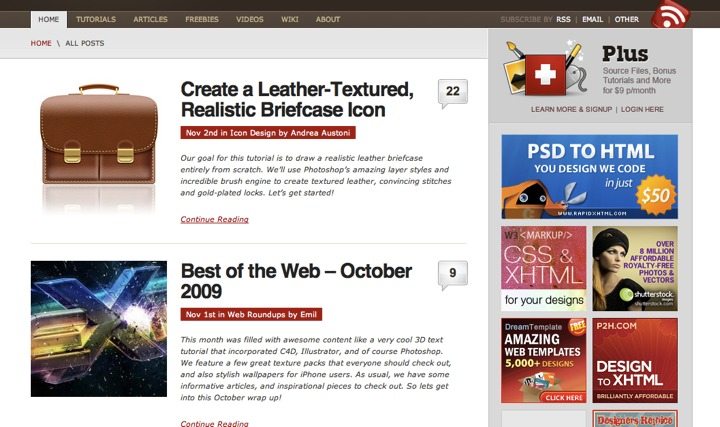
One example of a network of sites that do this well is Tuts+. They have a clear distinction between content and ads, though still offer a prominent position for their sponsors:
Quantity
A general rule of thumb used to be that content shouldn’t go “beyond the fold”. In reality, this “fold” isn’t as important as people once thought. Users are now completely used to scrolling, and expect to when visiting your site.
The important thing to achieve is to convey the main message of a page as soon as possible. Be sensible with the number of posts or amount of content displayed on each page for two reasons: (1) displaying the 30 most recent posts will mean your page takes a long time to load, and (2) a very long content column is unlikely to “balance” with the length other columns on your page.
Worth the Effort?
A question no doubt going through your mind at this stage is whether all this work is worth the effort. Why would you want to be included in a CSS gallery at all? Good question.
- Promotion & awareness: Everyone loves a little traffic to a new design, and being featured is a sure-fire way to have a bunch of people visit your site. It’s your job to convert them into subscribers, loyal fans, or paying customers.
- Prestige: Being featured in a range of different galleries is a great confidence booster. That said, don’t make it your sole goal (and please, please, don’t list them all in your footer)
- Future work: I’ve found that prospective clients often use design galleries as a way of finding a designer that has a particular style that they’re looking for. Being featured can be a good way to bring in new business.
Good Luck!
As a bonus for getting to the end of this article, I’d like to offer you a chance to submit a site to Design Shack for free (it usually costs $3.50). Once you’ve considered the points above, drop me an email at [email protected]. I’ll look over your submission and – hopefully – you’ll be seeing your site featured on Design Shack soon!
This email address is good for one week – after that, we’ll be shutting it off!