Design Shack showcases inspiring web design, alongside resources and tutorials for you to succeed in the same way. It is carefully curated and edited by Josh Johnson and David Appleyard.
Contact forms are an indispensable part of every website. They are mostly implemented on a separate page and they rarely display creativity, even though there are many ways to improve their visual style. In this tutorial you will see how to create a dynamic, slide-in contact form using jQuery.
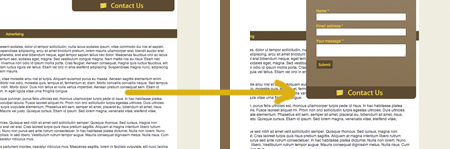
Let’s see what we’re trying to achieve with this tutorial. The image below shows the layout of our goal. In the upper right corner of the content is “Contact us” link. When the user clicks on it, the contact form will slide down. When the user submits the form they will get a message that their message has been sent successfully and within two seconds, the entire form will slide up.

Note: You can make this form fully functional by adding validation and some real code that sends the email.
Check out the demo and download full source code here.
Let’s explain the structure first.
1 2 3 4 5 6 7 8 9 10 11 12 13 14 15 16 17 18 19 20 21 22 23 | <div class=”box”> <div id=”contactFormContainer”> <div id=”contactForm”> <fieldset> <label for=”Name”>Name *</label> <input id=”name” type=”text” /> <label for=”Email”>Email address *</label> <input id=”Email” type=”text” /> <label for=”Message”>Your message *</label> <textarea id=”Message” rows=”3″ cols=”20″></textarea> <input id=”sendMail” type=”submit” name=”submit” onclick=”closeForm()” /> <span id=”messageSent”>Your message has been sent successfully!</span> </fieldset> </div> <div id=”contactLink”></div> </div> <div class=”header”> <h1> Company logo</h1> </div> … </div> </div> |
We have “contactForm” and “contactLink” divs inside the “contactFormContainer” which is positioned absolutely. ContactForm contains form elements, and contactLink will toggle our contact form on click. Simple enough, right? The CSS code will make this clearer:
1 2 3 4 5 6 7 8 9 10 11 12 13 14 15 16 17 18 19 20 21 22 23 24 25 26 27 28 29 30 31 32 33 34 35 36 37 38 39 40 41 42 43 44 45 46 47 48 49 50 51 52 53 54 55 56 57 58 59 60 | #contactFormContainer { position:absolute; left:600px; float:right; } #contactForm { height:277px; width:351px; background-image:url(’bkg.jpg’); display:none; } #contactForm fieldset { padding:30px; border:none; } #contactForm label { display:block; color:#ffc400; } #contactForm input[type=text] { display:block; border:solid 1px #4d3a24; width:100%; margin-bottom:10px; height:24px; } #contactForm textarea { display:block; border:solid 1px #4d3a24; width:100%; margin-bottom:10px; } #contactForm input[type=submit] { background-color:#4d3a24; border:solid 1px #23150c; color:#fecd28; padding:5px; } #contactLink { height:40px; width:351px; background-image:url(’slidein_button.png’); display:block; cursor:pointer; } #messageSent { color:#ff9933; display:none; } |
And to make this work, we have to add a touch of jQuery.
1 2 3 4 5 6 7 8 9 10 11 12 13 14 | $(document).ready(function(){ $(”#contactLink”).click(function(){ if ($(”#contactForm”).is(”:hidden”)){ $(”#contactForm”).slideDown(”slow”); } else{ $(”#contactForm”).slideUp(”slow”); } }); }); function closeForm(){ $(”#messageSent”).show(”slow”); setTimeout(’$(”#messageSent”).hide();$(”#contactForm”).slideUp(”slow”)’, 2000); } |
Let me briefly explain the code above. Clicking on #contactLink div will toggle contact form visibility. Once user submits the form, a message “Your message has been sent successfully!” will appear and the entire form will slide up to its original state.
Check out the demo and download full source code here.
This is just a sample of how you can improve user experience by adding dynamic content to your pages. Besides a contact form, you can create a slide-in login form, search form or anything that you think will improve the user experience.
Is there anything that could be done better? Do you know any other way of doing this? Share some examples!
This is great… seen it done on lots of sites and always wondered how it’s done. Thanks!
It is good realization of a good idea. However, it must be improved to fall back if JavaScript is disabled. This can be done by setting the display: none in the css file and setting display:block by JavaScript.
Also, the background of the contact form can be improved in at least three ways. Either by setting the background color of the contact form box (not to use the background image) or by making the background image 1px x 1pa and tiling it both horizontally and vertically. And finally, if you use the big background image, it can be preloaded.
The demo could be clearer. A user who just scanned the first few lines of the article should be able to eval the demo. THEREFORE the Contact button should say, “Click me”. It took me a while to figure out what to do, including debugging the NoScript plugin settings…
I wonder how long Steven stumbled around in that big form to figure out what to click on?
Sasa, you made good points.
Steven, I really don’t understand – isn’t ‘Contact us’ link BIG enough? And second: do you really think that ‘Click me’ is semantically better than ‘Contact us’ in this case? What would ‘click me’ mean to anyone?
Brilliantly simple! Thanks for sharing the Jquery.
The only comment I might make… while the form is indeed simple it wasn’t immediately clear how I could close the form if I decided not to send information.
Yes, after some poking around I did determine the Contact Us portion of the form was a toggle switch. Clever though I’m wondering if at least a jquery hover comment of some kind wouldn’t be helpful in this instance.
Thanks for sharing!
I implemented a similar jquery contact form on my site a few months ago, and it seems to work ok. The only thing I’ve done differently is that the link to the form is within the normal navigation.
Nice tut! Is it possible to make this come out of the RIGHT side of the page? Still displaying the form the same, of course (would be kinda hard to read and fill out, hah).
?
@mbh – yeah, a small “hide” button would do the work.
Nate, you can slide it out of any side, and you can do it by using .animate(…) method.
This is a nice implementation but so obstrusive! There should be a fallback solution but not hiding via css since there would be no contact form at all. Why not linking to a separate contact page if JS is disabled…
And yes I had a hard time to find the link in the upper right, a single paragraph of lorem ipsum should be enough.
Thank you, you code was just what I was looking for and using it has explained a few things. I am very new to jquery and javascript
Could you possible direct me as to how to add a dark overlay as background .when the form slides in
Hello! It could just be me being dumb, but do you have an extra closing DIV tag in your demo above?
Great stuff. I think I’m in love with the internet.
Unfortunately does not work in that stupid IE6. :-(
Moris, if I understood you correctly all you have to do is to set the background image for #contactForm.
Bret, yes, there is an extra div, my mistake.
Andrisi, yeah IE6 is stupid :-)
very cool form, only I am very new at this stuff, so I am interested how can I tell the form to submit the message to my e-mail
plis help
very cool form, only I am very new at this stuff, so I am interested how can I tell the form to submit the message to my e-mail
plis help
very cool form, only I am very new at this stuff, so I am interested how can I tell the form to submit the message to my e-mail
plis help
very cool form, only I am very new at this stuff, so I am interested how can I tell the form to submit the message to my e-mail
plis help
very cool form, only I am very new at this stuff, so I am interested how can I tell the form to submit the message to my e-mail
plis help
Note: You can make this form fully functional by adding validation and some real code that sends the email.
What is this code
Note: You can make this form fully functional by adding validation and some real code that sends the email.
What is this code
Note: You can make this form fully functional by adding validation and some real code that sends the email.
What is this code
Note: You can make this form fully functional by adding validation and some real code that sends the email.
What is this code
In IE7 i notice it jumps when opening and closing.
Also when you click the submit button it jumps down before displaying the message has been sent.
Any ideas why or how to fix?
Thanks and great work!!!
Ok i think i have fixed the bounce but have one more question.
How would you make it close if you click out side of the contact form div.
I added
$(“.content”).click(function(){
$(“#contactForm”).slideUp(“fast”);
});
But there is probably a better way to do this.
Note: You can make this form fully functional by adding validation and some real code that sends the email.
What is this code
Very nice form, just not validated:(
Just beginning with jQuery, struggling to add working code to this – It’s a nice effect, does anyone have any examples with validation/mail code?
Anybody? Thanks in advance :)
I had some luck combining this with the jQuery form plugin if anyone is looking for a way to make this functional.Search ‘ultra-slick-ajax-contact-form-with-jquery’ for a good tutorial.
Hope it helps someone.
To ensure users will still be able to use the contact form if javascript is disabled/unavailable, you can make the “contactLink” an actual link to a stand-alone contact page, and use the following code:
$(”#contactLink”).click(function(e){
e.preventDefault();
if ($(”#contactForm”).is(”:hidden”)){
$(”#contactForm”).slideDown(”slow”);
}
else{
$(”#contactForm”).slideUp(”slow”);
}
});
If the user has javascript enabled, the form will slide in as expected, but if they don’t, they will be taken to the stand-alone contact page.
In the above code, i dont know how the slide initially in up . Iam new to jquery, can any one explain
nice work dud
As Luke said:
“Just beginning with jQuery, struggling to add working code to this – It’s a nice effect, does anyone have any examples with validation/mail code? ”
I’d also like some examples so I can this great form to work. Thanks.
nice work!
Anyone have a full working version, actual email submission & everything?
I’m having an issue implementing this correctly.
How about recognizing the open and closed states, for adding specific styles to the button?
nice work! but how do the comments reach me? at what point do i intergrate with PHP/jsp/asp ? i want the comments to go to a database.
help please
This demo is really great. Anyone know of a good way to integrate with coldfusion, remaining on page as demonstrated and emailing form values to a certain address? Any thoughts much appreciated.
but how to add real code to make it work?
need php or something?
thx
It worked on IE6 for me. But it flickers, I think I can fix the flicker issue myself
Thank you for the great tutorial
T.
Looks great but as others have said; how do you actually make it send the message?
I have been trying to make this work well with FormMail but am I right in thinking that only functions with a form and not a fieldset?
cool effect. I really love it.
thanks
when you open the page or refresh page the dropdown is expanded and will not collpase till you send email or click contact us. Please help i do love this website feature.
Hey guys, thanks for the comments. To answer the question many of you asked – Why there is no validation or mail sending logic – the idea behind this article was to create an interactive, visually enhanced web form, not to implement any logic. There are tons of tutorials on how to do validation/sending emails in different technologies like PHP, ASP.NET and so on, and I suggest you to check out some of tutorials that explain these techniques.
mmnm.,.,mm,mm.,
m,,m,
Question – How when does the ‘closeForm’ function actually get called? I understand that onclick the form either goes up down, if it is down already, it goes up. I don’t understand how the closeForm gets initiated though.
Hey. I like the tutorial, but I’m having an annoying problem…
How can I make it so that the form submit button doesn’t redirect OR refresh the page when pressed? In the example yours doesn’t, but when I try to, mine does.
Just wondering.
test
Hi, I would like to use this plug-in for one of my sites, but I don’t see where I could change the text button for the submit button : SUBMIT QUERY???
I would like to make it OK for example.
Can you please help?
Thanks
That’s OK, I’ve find it.
Great thanks….
I know this sounds daft but where can I get some code from so that the form works/sends?
many thanks!
hellow
Endocrines are tasty.
This is really nice…does it work in IE6? Just wondering as I need something like this that does!
Thanks for a great demo.
where have to change the email¿???
nice, but isn’t there a php file missing somewhere ?
LS, The wedding couple hoochie-dance was cute. ,
And then, allegedly, Roethlisberger blocked her exit and raped her. ,
What a great little script.
I’ve modified it slightly so that it degrades gracefully with javascript turned off.
Hope it is of use to someone.
I wrapped the contactLink div in a link
and added a line to the contactLink click function to prevent the link being followed. Obviously this bit will only run if javascript is turned on!
$(document).ready(function(){
$(“#contactLink”).click(function(e){
e.preventDefault(); //Stops normal <a href behaviour
if ($("#contactForm").is(":hidden")){
$("#contactForm").slideDown("slow");
}
else{
$("#contactForm").slideUp("slow");
}
});
});
Could you spare me a moment? buy cheap nolvadex http://www.stumbleupon.com/stumbler/med-brother/ buy chemical citrate nolvadex research tamoxifen I’m very thankful to you.
I’ll just like to tell you that… buy nolvadex without a prescription buy generic nolvadex
buy clenbuterol nolvadex online See you soon!
Good evening! buying clomid line http://wiki.answers.com/Q/User:Med-help buy clomid 100mg You’re not in a hurry, are you?
Are you very busy at the moment? buy clomid in the united states buy clomid 5 mg
buy clomid 100mg Thank you very much.
I love this little thing!
However, being a complete newbie to php I am having issues getting this thing to actually send some mail my way.. =/
Could someome point me in the direction of some php that would work wonders with this thing?
I have a feeling that I can’t get it working, because whatever I do, the php wants to redirect to a new site when I hit submit..
Any help is greatly appreciated!
Very nice and useful tutorials to web designers,
Thanks for posting.
How can i make this slide up instead of down?
I have done to one of my client websites, it is working.
Thanks Mate.
Nice script. So easy to impliment.
thanks.